Philips Support
How do I charge the Philips Avent Video Baby Monitor parent unit, and what do the battery lights mean?
To charge the parent unit, connect one end of the included USB-C cable to the parent unit and the other end to a suitable power adapter.
Use a certified IEC 62368-1 safety extra-low-voltage (SELV) power supply with an output of 5 V and at least 1 A.
What do the battery lights mean?
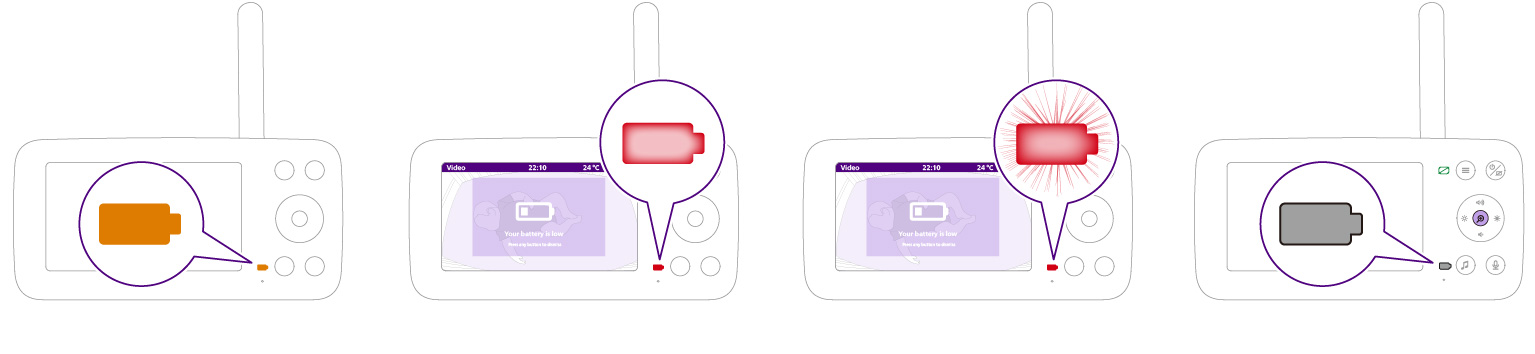
- Solid orange: The parent unit is plugged in and charging.
- Flashing red slowly: The battery level is low, at approximately 5–10%.
- Flashing red quickly: The battery is almost empty. The parent unit also displays a low-battery message and beeps every 2 minutes until the warning is dismissed.
- Battery status light off: The battery may be fully charged, or the parent unit may be unplugged with more than 10% battery remaining.
- Battery status light off + display status light solid green: Battery saver mode is active.
The information on this page applies to the following models: SCD861/26, SCD863/26, SCD871/26.
Frequently Asked Questions
How do I adjust sound sensitivity on the Philips Avent Video Baby Monitor?
Does my Philips Avent Video Baby Monitor need Wi-Fi or an internet connection?
How do I factory reset the Philips Avent Video Baby Monitor?
How do I set up or pair my Philips Avent Video Baby Monitor?
What is the operating range of my Philips Avent Video Baby Monitor?
How do I charge the Philips Avent Video Baby Monitor parent unit, and what do the battery lights mean?
How do I use talk-back on the Philips Avent Video Baby Monitor?
How do I play lullabies and soothing sounds on the Philips Avent Video Baby Monitor?
What’s the best placement for the Philips Avent Video Baby Monitor baby unit?
What monitoring options are available on the Philips Avent Video Baby Monitor?
Can I connect my baby camera to a parent unit of another baby monitor?
Looking for something else?
Discover all Philips Support options