Philips Support
How do I adjust sound sensitivity on the Philips Avent Video Baby Monitor?
On the parent unit:
- Press the menu button to enter the menu.
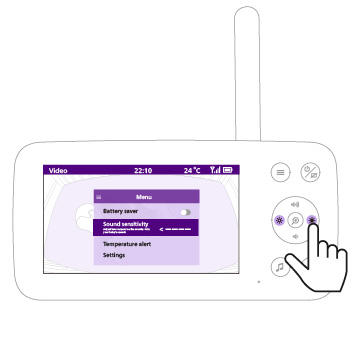
- Use the control button to highlight "Sound sensitivity" and press the center of the control button to select.
- Press the left or right side of the control button to adjust the sound sensitivity.
- Press the center of the control button to exit the menu. You can also wait a few seconds for the menu to close automatically.
Higher sensitivity lets you hear quieter sounds from your baby’s room. Lower sensitivity reduces the impact of quieter background sounds.
Tip: If there is continuous background noise from sources like a fan or air conditioning, decrease the sensitivity to prevent affecting the sound level lights or allowing these sounds to be heard on the parent unit. The sound sensitivity level will also affect the display's responsiveness in battery saver mode. To learn more about battery saver mode, see “What monitoring options are available on the Philips Avent Video Baby Monitor?”
The information on this page applies to the following models: SCD861/26, SCD863/26, SCD871/26.
Frequently Asked Questions
How do I adjust sound sensitivity on the Philips Avent Video Baby Monitor?
Does my Philips Avent Video Baby Monitor need Wi-Fi or an internet connection?
How do I factory reset the Philips Avent Video Baby Monitor?
What is the operating range of my Philips Avent Video Baby Monitor?
How do I charge the Philips Avent Video Baby Monitor parent unit, and what do the battery lights mean?
How do I use talk-back on the Philips Avent Video Baby Monitor?
How do I play lullabies and soothing sounds on the Philips Avent Video Baby Monitor?
How do I set up or pair my Philips Avent Video Baby Monitor?
What’s the best placement for the Philips Avent Video Baby Monitor baby unit?
What monitoring options are available on the Philips Avent Video Baby Monitor?
Can I connect my baby camera to a parent unit of another baby monitor?
Looking for something else?
Discover all Philips Support options