Support homepage
Philips Support
How do I change the speed settings of my Philips Epilator?
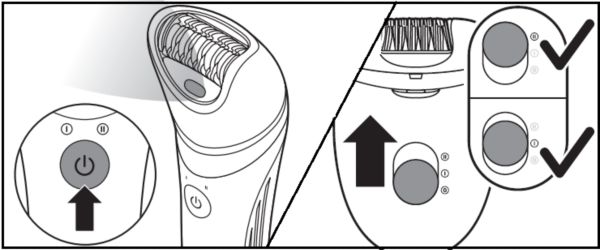
If you press the on/off button once, the Philips Epilator starts on a high-speed setting (setting II). If you press on/off again, the speed setting changes to a low speed (setting I). When you press the on/off button the third time, your epilator switches off.
Note: The Essential epilator is equipped with 2 speed settings. When using the shaving head, there is only 1 speed setting available. This setting is most ideal for shaving.
The information on this page applies to the following models: BRE247/00 , BRE740/90 , BRE740/11 . Click here to show more product numbers ›
Frequently Asked Questions
How do I change the speed settings of my Philips Epilator?
Will I damage the lymphatic vessels in my armpit when I use the epilator?
Where is the model and serial number on my Philips depilation device?
Can I rinse my Philips depilation products with water?
Can I travel with my Philips grooming or beauty product?
Looking for something else?
Discover all Philips Support options