


Feel your game
Evnia 5000
32 (31.5"/80 cm diag.)
3840 x 2160 (4K UHD)
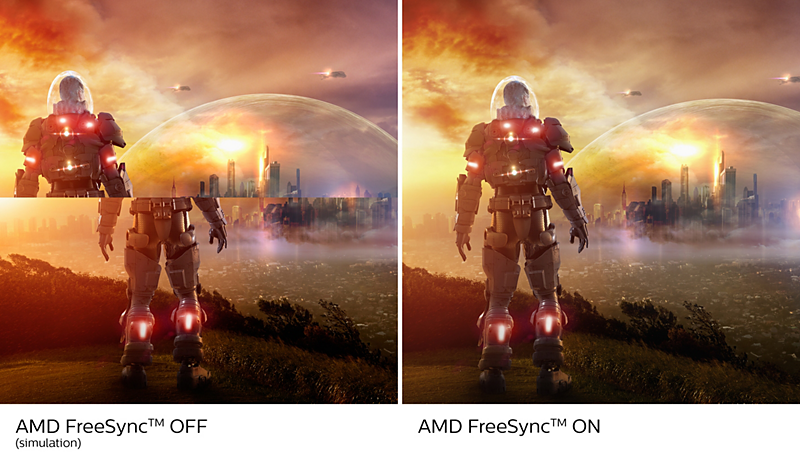
AMD FreeSync™ Premium; tear free, stutter free, fluid gaming
Gaming shouldn't be a choice between choppy gameplay or broken frames. AMD FreeSync™ Premium equips serious gamers with a fluid, tear-free gameplay experience at peak performance. There are no compromises, game confidently with a high refresh rate, low framerate compensation and low latency.

Certified NVIDIA® G-SYNC® compatible for smooth, fast gaming
When playing intense games with high refresh rates, screen tearing may appear without optimal graphics synchronisation. This Philips display is certified as NVIDIA® G-SYNC® compatible, reducing screen tearing and syncing your monitor's refresh rate with your graphic card's output for a smoother gaming experience. Scenes appear instantly, objects look sharper, and gameplay is smooth, giving you a stunning visual experience and a serious competitive edge.

UltraClear 4K UHD (3840 x 2160) resolution for precision
These Philips displays utilise high-performance panels to deliver UltraClear, 4K UHD (3840 x 2160) resolution images. Whether you are a demanding professional requiring extremely detailed images for CAD solutions, a user of 3D graphics applications or a financial wizard working on huge spreadsheets, Philips displays will make your images and graphics come alive.
Technical specifications
Awards

Sign up to the Philips newsletter for exclusive offers
- Member-exclusive offers.
- Early access to sales.
- News on product launches and tips for healthy lifestyles.
- Member-exclusive offers.
- Early access to sales.
- News on product launches and tips for healthy lifestyles.
"IPS" word mark / trademark and related patents on technologies belong to their respective owners.
For best output performance, please always ensure that your graphic card is capable of achieving the maximum resolution and refresh rate of this Philips display.
Response time value equal to SmartResponse
MPRT adjusts the brightness for blur reduction, so the brightness cannot be adjusted while MPRT is turned on. To reduce motion blur, the LED backlight will strobe in time with the screen refresh rate, which may cause a noticeable change in brightness.
MPRT is a gaming-optimised mode. Turning on MPRT may cause noticeable screen flickering. It is recommended to turn this mode off when you are not using the gaming function.
NTSC Area based on CIE 1976
sRGB Area based on CIE1931
Adobe RGB Coverage based on CIE 1976
NVIDIA® G-SYNC® support interface: DisplayPort
Make sure to update NVIDIA® G-SYNC® driver to the latest version, see more information on NVIDIA website: https://www.nvidia.com/
Make sure that your graphic card supports NVIDIA® G-SYNC®
2020 Advanced Micro Devices, Inc. All rights reserved. AMD, the AMD Arrow logo, AMD FreeSync™ and combinations thereof are trademarks of Advanced Micro Devices, Inc. Other product names used in this publication are for identification purposes only and may be trademarks of their respective companies.
The monitor may look different from feature images.